Your own private hub. We host and run it.
Files, email, chat, calendar and documents in one private workspace on your own domain, running on TitanNet hardware in the USA. One monthly price per person, and support you can reach from your dashboard.
- Your data stays yours
- Encrypted in transit
- Works on every device
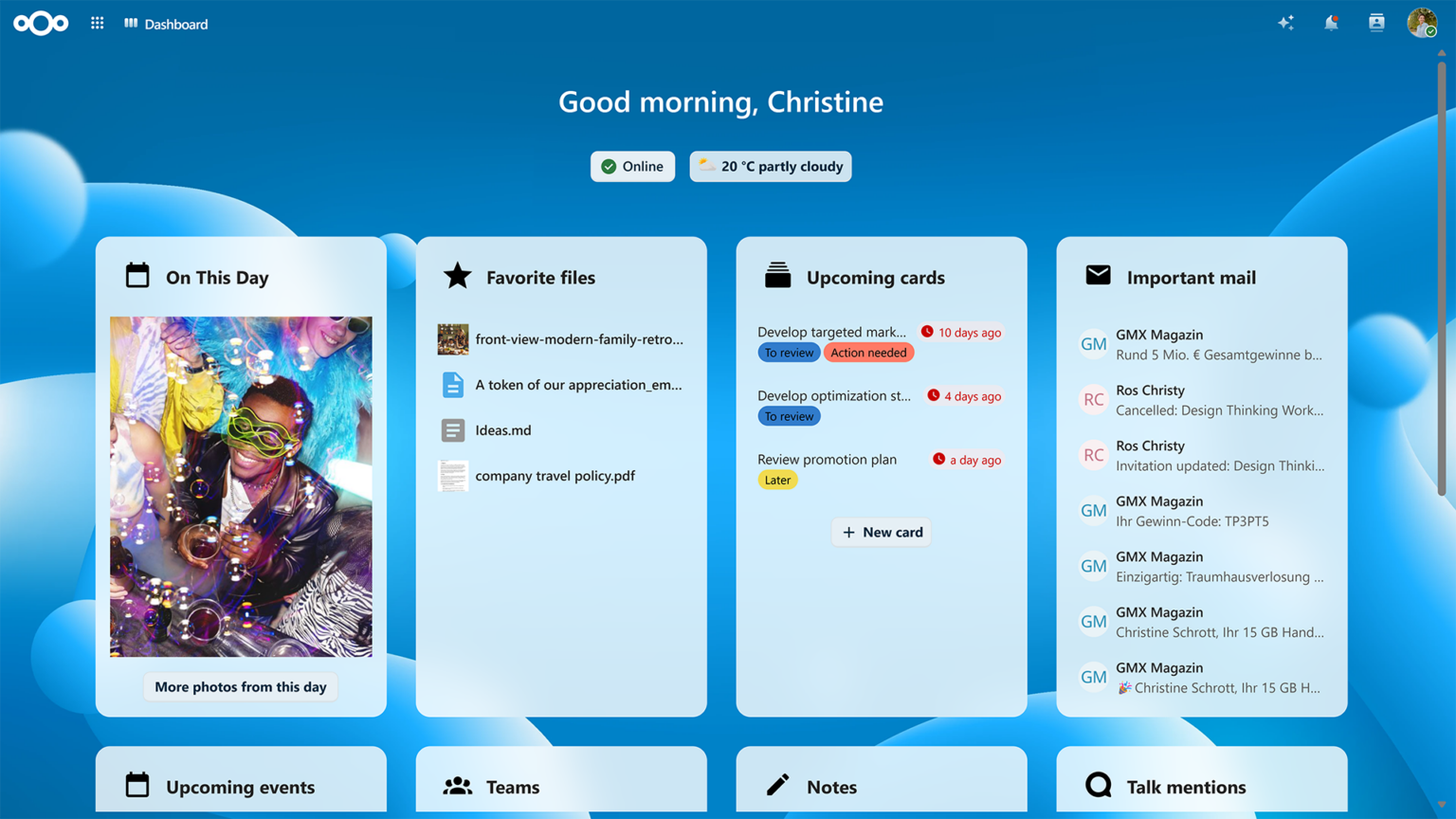
One login for your whole workday — this is the dashboard your team signs into.
See it in action
Look inside the workspace
Screenshots from Nextcloud Hub — the software your team signs into, running on our hardware in the USA.
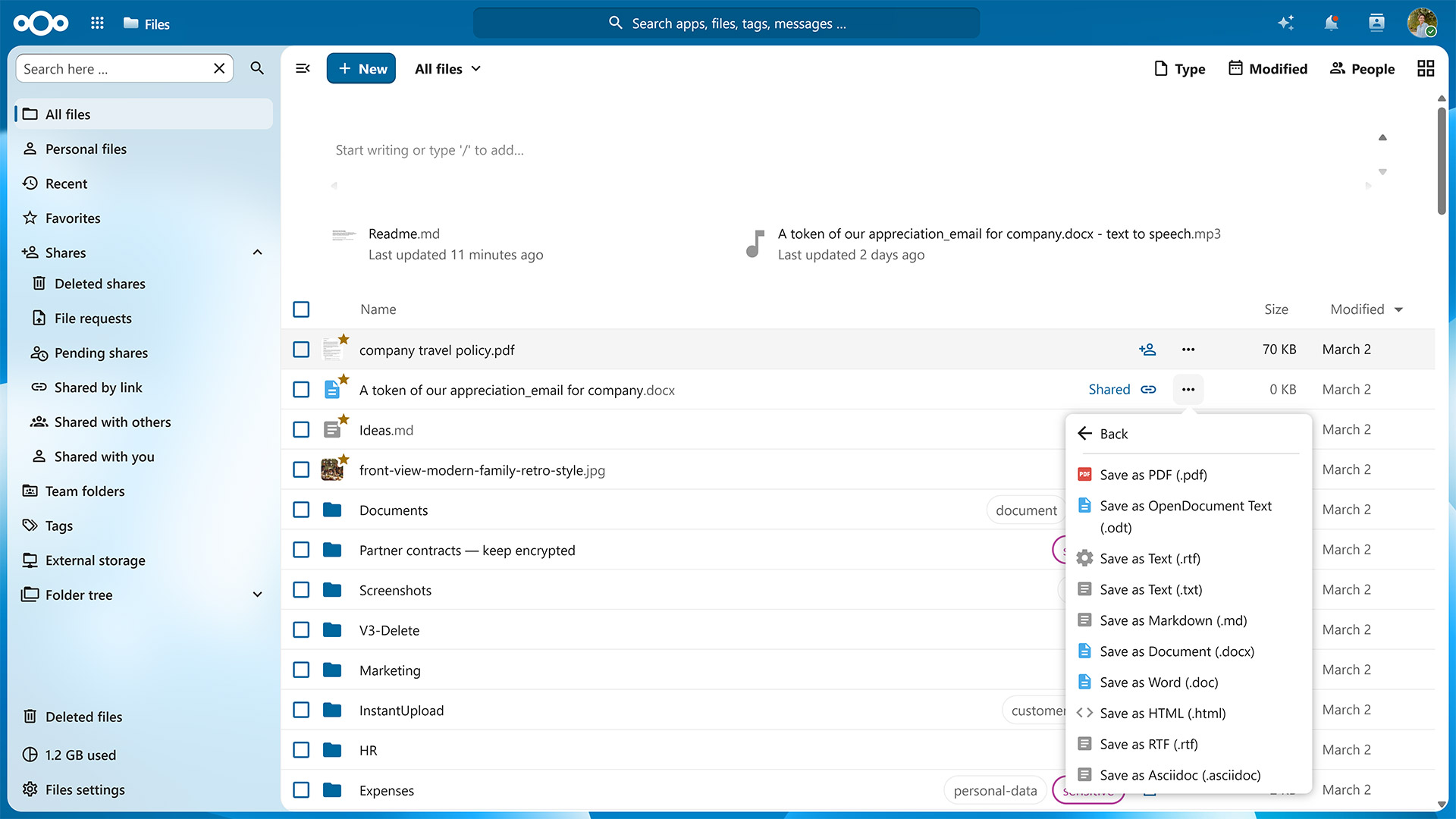
Files
Every file in one place — and on every device
Your company's documents live on a private server we run for you — not in somebody else's cloud. Desktop clients keep folders in sync, and sharing is controlled: a link can carry a password and an expiry date.
- Sync clients for Windows, macOS and Linux
- Share links with passwords and expiry dates
- Version history and one-click restore
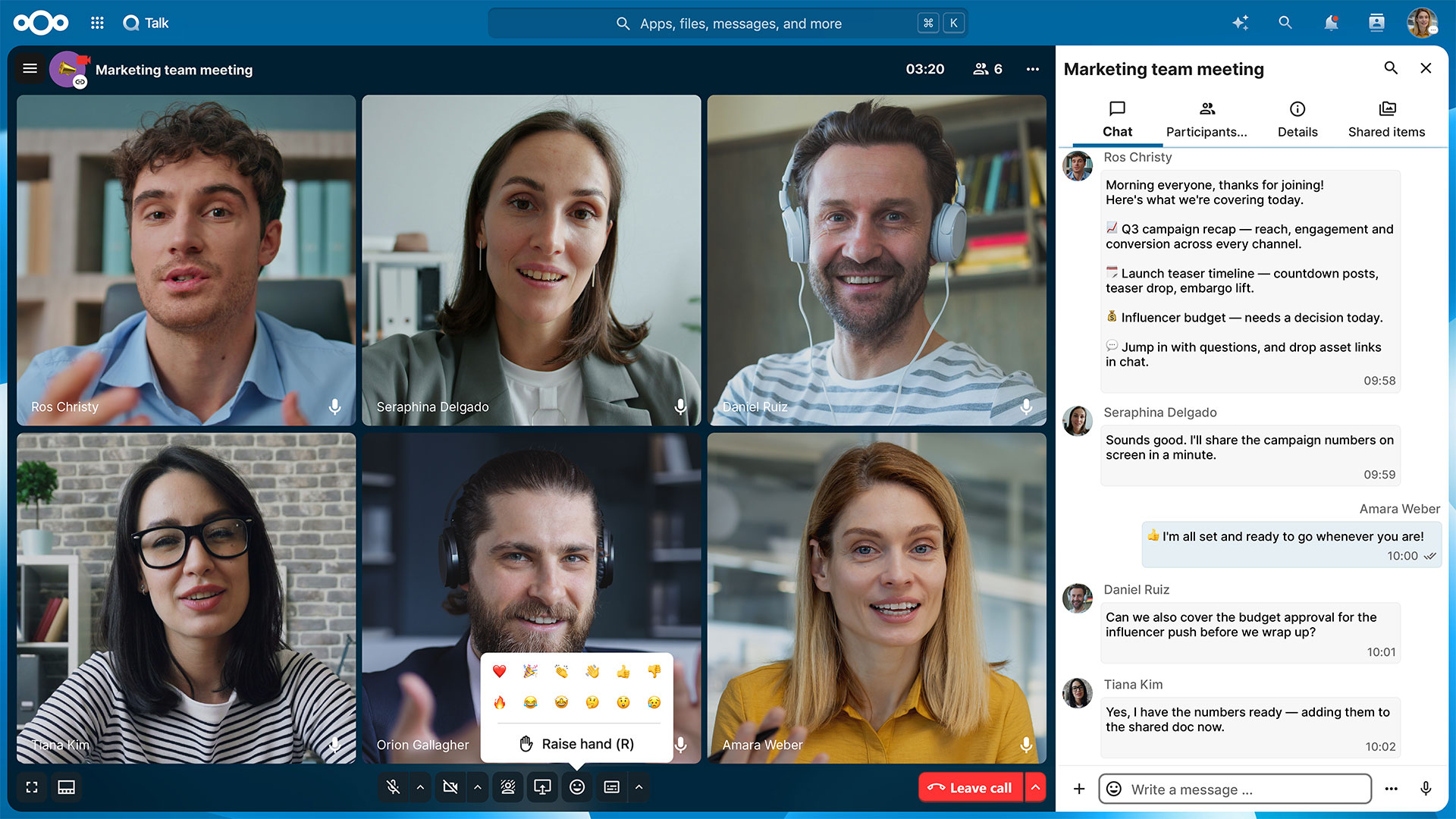
Talk
Chat, call and meet without another subscription
Group chats, direct messages, voice and video calls with screen sharing — all running on the private server we manage for you. Guests can join by link, so clients and subcontractors don't need an account.
- Group chats and one-to-one messages
- Voice and video calls with screen sharing
- Guest links for people outside the company
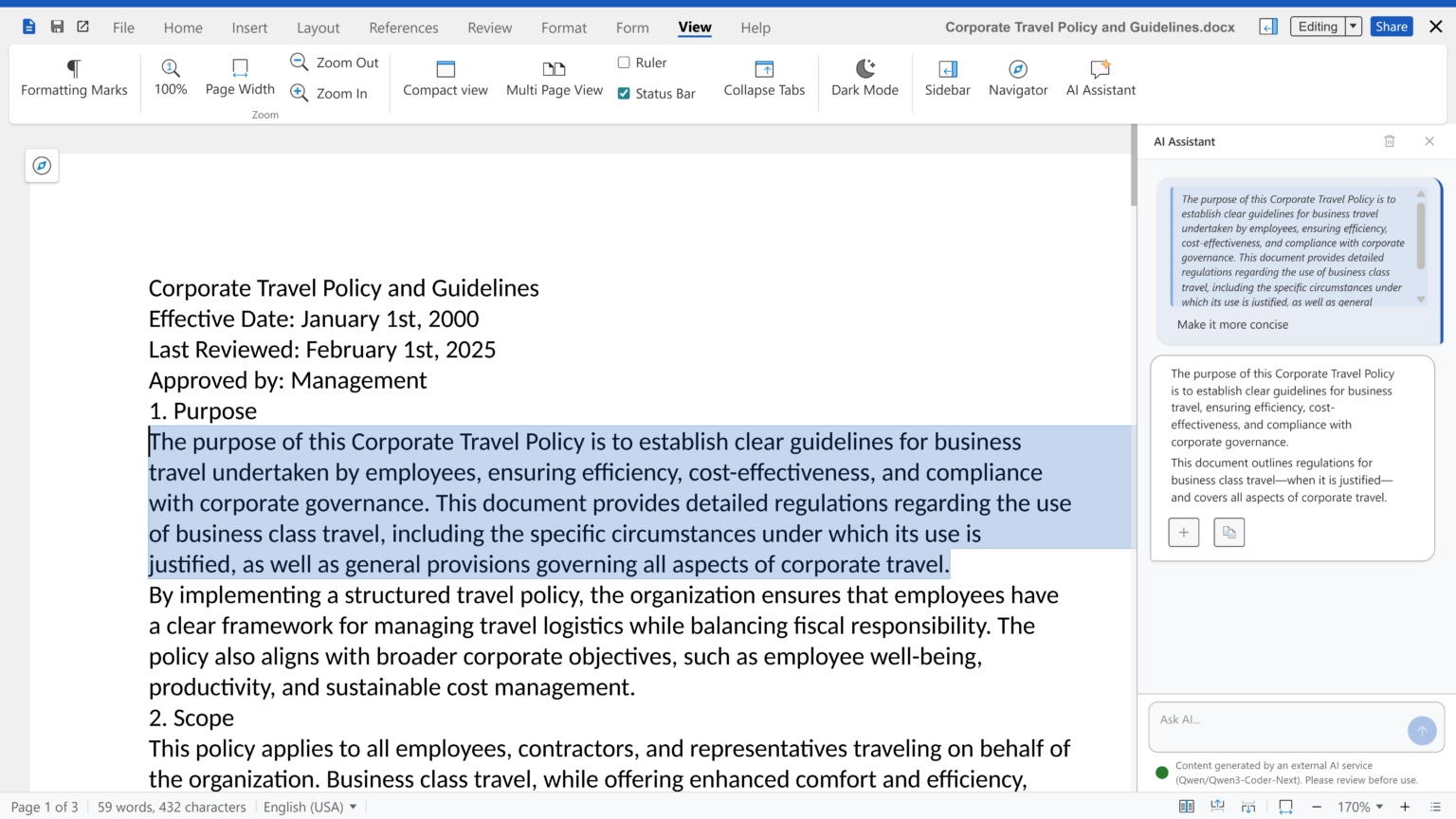
Office
Open the Word and Excel files your clients send
Documents, spreadsheets and presentations open in the browser and several people can edit at once. Comments and tracked changes work the way your team already expects.
- Real-time editing in the browser
- Opens Microsoft Word, Excel and PowerPoint files
- Comments and tracked changes
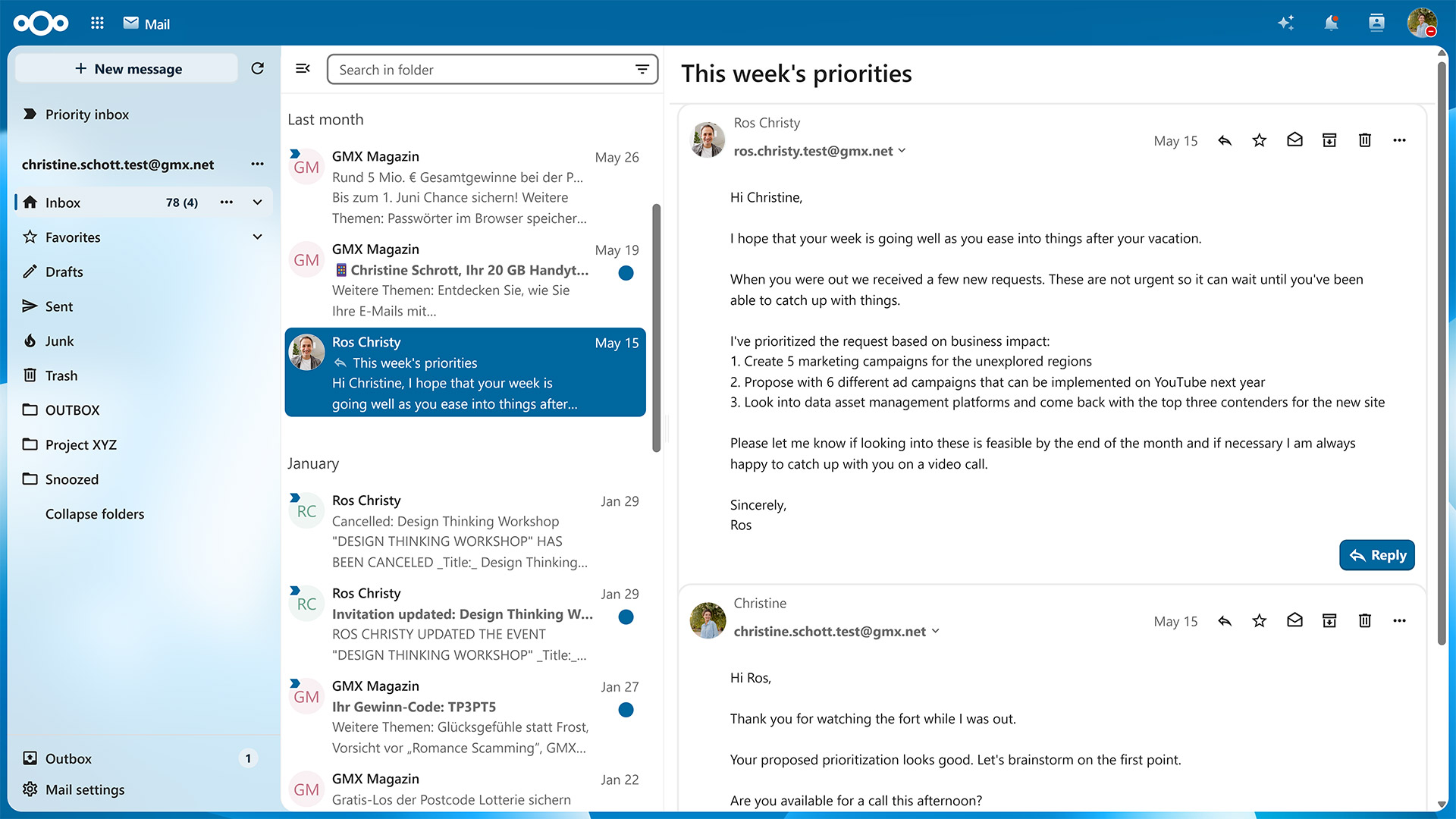
Business email in the same hub
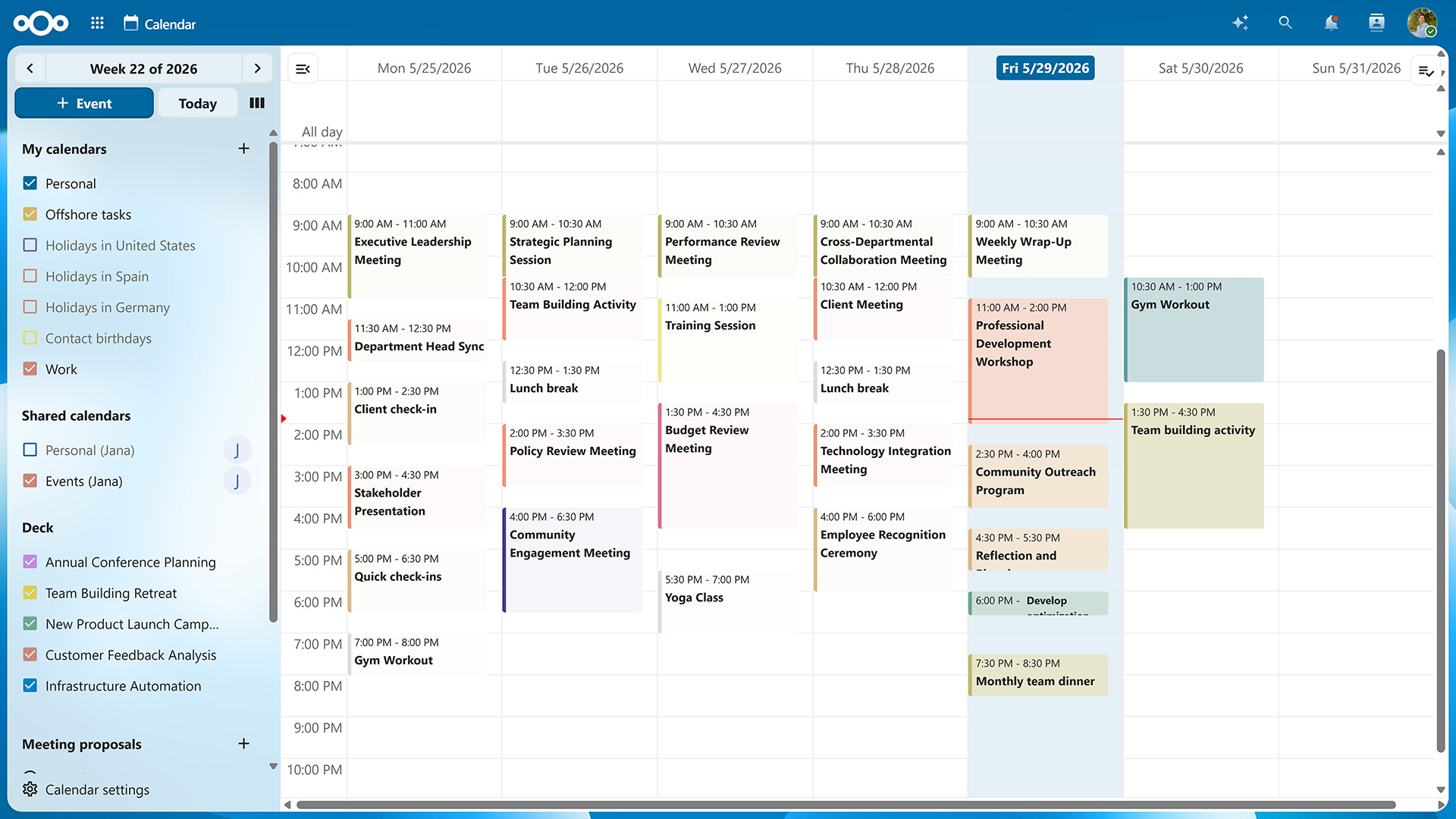
Calendar
Shared calendars and invitations
Dashboard
A start page for your day
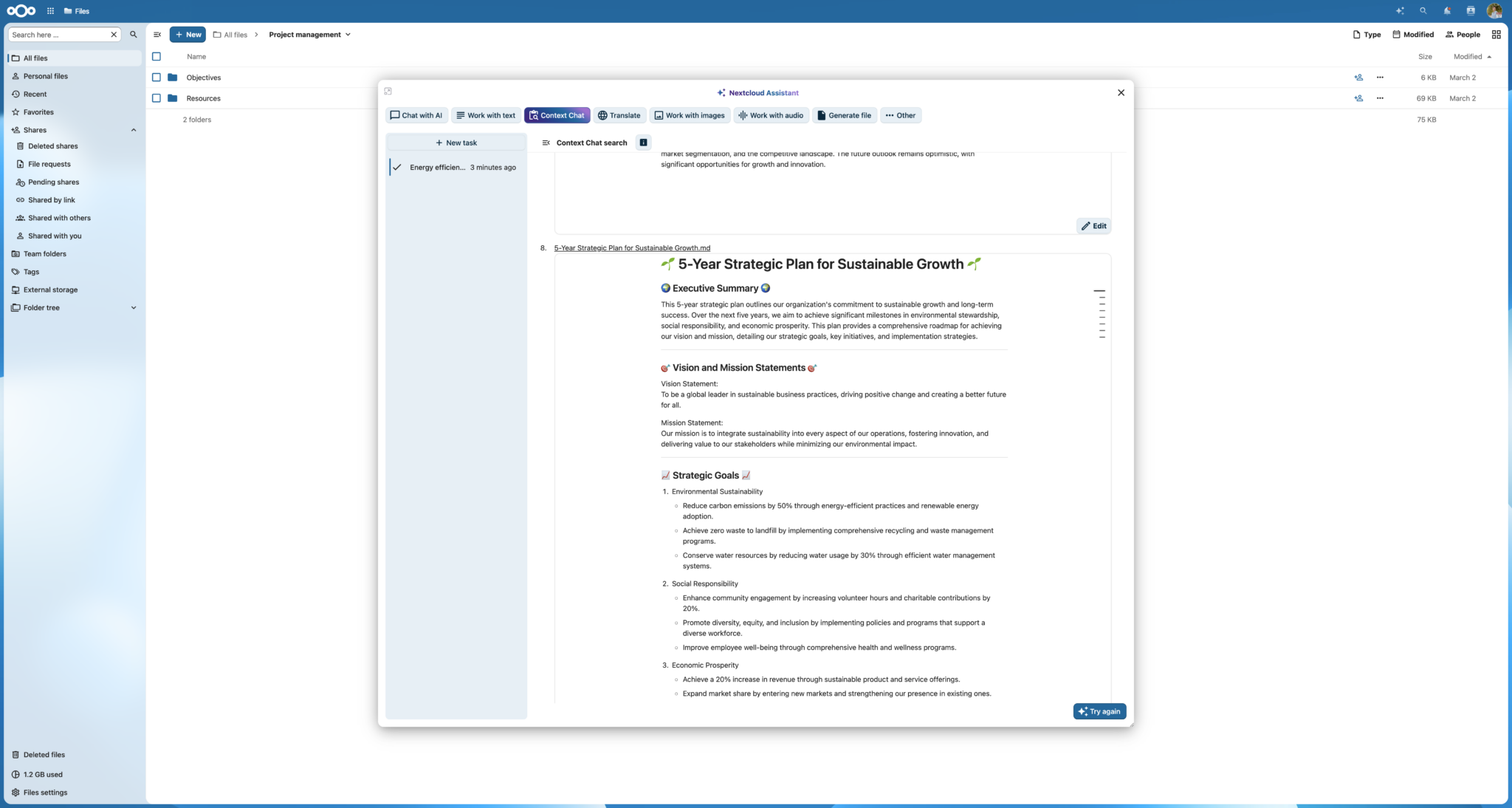
Assistant
Ask questions about your own files
That's the tour — the workspace also includes Tasks, Deck, Forms, Notes, Contacts, Photos, Whiteboard and more. See all the apps
The suite
Everything your team needs, in one login
No per-app subscriptions and no chat or document licences to buy. Pick what you want now — we set it up, keep it updated, and back it up.
Nextcloud Files
Your team's files, synced to every device, with share links and version history.
Nextcloud Talk
Team chat plus voice and video calls, on a private server we run for you.
Nextcloud Mail
Your business email in the same hub, so mail, files and calendar stay together.
Nextcloud Office
Word, Excel and PowerPoint files edited together in the browser — no Microsoft 365.
Files & photos
Talk, mail & scheduling
Documents & data
Plan & organise
Your workspace & access
Want something else? Nextcloud has hundreds of add-on apps — if you need one, ask and we'll install and manage it for you.
Tables and Passwords come with the Pro plan. Everything we install — on any plan — is set up, backed up and supported by us.
15
apps in the Basic plan — files, mail, chat, calendar, office and more
+2
more on Pro: Tables for structured data, Passwords for a shared vault
$1/user
the optional AI assistant on Pro ($2 on Basic)
You run the business. We run the system.
Hosting, updates, backups and the support ticket when something looks wrong are our job. Your files, your accounts and your domain stay yours.
Managed for you
We run it. You own your data.
TitanNet installs, secures and maintains the whole workspace. Your team signs in and gets to work — you keep ownership of your data, accounts and settings.
What we take care of
- Hosting and updates
- Your workspace runs on TitanNet hardware in the USA. Updates and security patches are applied for you.
- Backups and monitoring
- Daily database backups plus around-the-clock monitoring of the whole stack.
- Your domain and certificates
- Bring a domain you already own or take a TitanNet.dev subdomain — we handle DNS and the TLS certificate either way.
- Business email, set up with the workspace
- 15 GB inbox per seat, connected to the same account your team signs into.
- Migration from Google or Microsoft
- We copy your mail, calendar, contacts and files across — and your old accounts stay live until you are satisfied nothing is missing. Your domain and email addresses stay exactly as they are.
- Getting your team actually using it
- We set it up on your team's phones and laptops and walk them through it. A system nobody uses is just a bill.
- Support that keeps a written record
- Questions, changes and new apps go into the help desk, where every detail stays with the ticket until it is closed.
What stays yours
- Your data — it belongs to you, and you can export it all at any time
- User accounts, groups and permissions
- Which apps are switched on for your team
- Your logo, colours and branding inside the workspace
- No lock-in: leave with your files whenever you want
Two dashboards, two jobs
Inside the workspace your team does the work. In the TitanNet business dashboard you see your plan, your team and your usage — and manage the add-ons you pay for.
Security
Private by default, explained in plain English
Locked down out of the box — and written down in words that make sense to the person paying the bill.
- Encrypted in transit, everywhere
- Every connection to your workspace uses HTTPS/TLS, so nothing can be read while it travels.
- End-to-end encryption for sensitive folders
- Optional, folder by folder, with the keys held by your team — not by us. It is a deliberate choice you switch on, not something we pretend is automatic.
- Two-factor authentication and permissions
- Require 2FA, set granular permissions per group, and see who did what in the activity log.
- Your data is not the product
- No mining, no profiling, no resale. It is stored on TitanNet hardware in the United States and you can export all of it whenever you like.
- Backups and monitoring
- Daily database backups and around-the-clock monitoring, so problems get found before your team notices.
- Antivirus and file scanning
- Uploads are scanned as they arrive, so a stray attachment does not become an office-wide problem.
In plain English
What is HTTPS?
The padlock in your browser. It scrambles everything travelling between your devices and your workspace, so nobody on the network can read it — the same protection your bank uses.
What is two-factor authentication?
A second check when you sign in, like a code from your phone on top of your password. Optional — switch it on for yourself or the whole team whenever you are ready.
What is end-to-end encryption?
Normally our server can unlock a file so you can open it anywhere. With end-to-end encryption on a folder, only your devices hold the keys — not even our server can read it. Optional, and ideal for your most sensitive files.
Who can see my files?
Only the people you choose. Permissions are set per person, per folder or per file, and you can invite an outside guest with limited access whenever you need to.
What do the activity logs show?
A running record of what happened — files changed, files shared, sign-ins and more. If you ever wonder what happened to something, the answer is in there.
AI assistant
An assistant that works on your own files
Optional, priced per user, and switched on when you want it — inside the same workspace as everything else.
Ask questions about your own documents
Point the assistant at files in your workspace and ask for a summary, the key numbers, or what changed since last month.
Draft, shorten and translate
Write a reply, tighten a proposal, or translate a document into another language without leaving the workspace.
Your choice of provider and key
Use a key we manage, or bring your own account. Either way, switching providers later is a setting, not a rebuild.
$1 per user / month on Pro · $2 on Basic
Usage credits are separate and managed from your dashboard. When your team uses the assistant, what they send is processed by the provider you choose (DeepSeek, OpenAI or Grok): the text of the question, and — if they attach a picture — that image. Your files otherwise stay in your workspace, on hardware we run.
Simple & affordable
One price per person, everything included
Two plans, three team sizes each. Every plan is hosted and managed by us on TitanNet hardware in the USA — no per-app subscriptions, no separate chat or document licences. The plan picks your apps, the size picks your rate, and bigger teams pay less per person.
Basic
The complete private hub for everyday business — everything below is included.
All 15 apps are included — files, chat, mail, calendar, office documents, tasks, boards, forms, notes, contacts, photos, whiteboard and appointments.
See all the appsThree sizes — per user / month
The per-user rate drops as your team grows — the wizard prices your exact headcount. Every seat includes a 15 GB email inbox.
Pro
Most powerfulEverything in Basic, plus Tables, Passwords — and AI for half price.
All 15 Basic apps are included, plus Tables for structured data and Passwords for a shared company vault.
See all the appsThree sizes — per user / month
The per-user rate drops as your team grows — the wizard prices your exact headcount. Every seat includes a 15 GB email inbox.
What does Pro actually add? Two tools — and a cheaper AI add-on.
Nextcloud Tables
Turn plain lists into structured, team-editable databases — then build simple applications on top of them: client records, inventories, project trackers, and forms your whole team actually uses. Spreadsheets stay in the drawer.
Passwords
A shared, encrypted company vault. Store the logins and secrets your team needs — office accounts, Wi-Fi, vendor portals — with controlled access, instead of a spreadsheet or a sticky note.
Shared storage for your whole team
One pool everyone draws from — and you can always add more later as you grow. Every seat also includes 15 GB of dedicated email inbox storage.
500 GB
$15 / month
Most popular
1 TB
$25 / month
2 TB
$45 / month
4 TB
$80 / month
Need more than 4 TB or more than 200 people? We'll build a custom plan with you.
Add the AI assistant to any plan — $1 per user / month on Pro · $2 on Basic
Pick DeepSeek, ChatGPT, or Grok during signup — it works inside Files, Mail, and the whole hub. Usage credits are separate and managed from your dashboard.
Your first week is free — no charge until your workspace is ready.
Compare
The same everyday tools, a different deal underneath
Files, mail, chat, calendar and documents — with a very different answer to who owns the platform.
What matters
TitanNet
Google Workspace / Microsoft 365
What it is
TitanNet
A private Nextcloud workspace that we set up, host and manage for you.
Google Workspace / Microsoft 365
Proprietary cloud suites (Google Workspace, Microsoft 365).
Where your data lives
TitanNet
A private workspace we run for you, on TitanNet hardware in the USA.
Google Workspace / Microsoft 365
On the provider's cloud, under their terms.
Who is in control
TitanNet
You — accounts, apps and permissions are yours to change.
Google Workspace / Microsoft 365
The provider owns the platform and sets the rules.
Source code and lock-in
TitanNet
Open source. Export everything any time — no lock-in.
Google Workspace / Microsoft 365
Closed source; moving your data out can be difficult.
What you pay for
TitanNet
No software licence fees — you pay for hosting, management and support, priced per person.
Google Workspace / Microsoft 365
A per-user software licence, plus whatever services you add on top.
Setup and support
TitanNet
We set it up, and support stays reachable from your dashboard.
Google Workspace / Microsoft 365
Mostly self-serve documentation and ticket queues.
This comparison is informational and each platform has its own strengths. Google Workspace is a trademark of Google LLC; Microsoft 365 is a trademark of Microsoft Corporation.
How it works
From form to workspace, usually within a day
No discovery calls, no onboarding project, no six-week rollout.
Tell us about your business
Fill in the form — company, plan, team, the apps you want. About five minutes, and no sales call required to get started.
We check the details with you
We read every signup ourselves. If something looks off — a domain, a seat count, a mailbox — we get in touch before building anything.
We build your workspace
We create your private workspace on our own hardware in the USA, install the apps you picked, and set up your email, domain and security certificates.
Your team signs in
Usually within a day. Everyone gets their own account, and you get the business dashboard for your plan and team.
Your first week is free
Try the whole workspace for seven days. Billing starts after that, month to month, and you can cancel any time.
FAQ
Questions, answered
The things people ask before they sign up.
What is Nextcloud, in one sentence?
An open-source workspace — files, email, chat, calendar and office documents — that TitanNet hosts and manages privately for your business, instead of you renting five separate services.
Who owns my data?
You do. It sits on TitanNet hardware in the USA, it is never mined or sold, and you can export all of it whenever you want.
Can I use my own domain?
Yes. Bring a domain you already own, or pick a TitanNet.dev subdomain. We handle the DNS and the security certificate either way.
Does it work on phones?
Yes. Official Nextcloud apps for iOS and Android cover files, chat, calls and photos, and your calendars, contacts and tasks sync into the apps already on the phone.
How secure is it, really?
Everything travels over HTTPS, two-factor authentication and per-group permissions are available, uploads are scanned, and end-to-end encryption can be switched on for your most sensitive folders.
How long does setup take?
Most small teams are signed in within a day. You will get a clear timeline when you fill in the form — and a person, not an autoresponder, if anything needs clarifying.
Can we add or remove apps later?
Yes. Start with what you need and change it any time — we install and manage the change for you.
What happens if we want to leave?
You take your data with you. Everything can be exported, we hand over the files and mail, and we shut the workspace down when you tell us to — no exit fee, no hostage-taking.
Can the price change on us?
Prices are published on this page and your plan is billed month to month. If our prices ever change, we tell you in advance, you keep the rate you signed up at until then, and you can cancel before the change takes effect.
What if we outgrow our storage or our plan?
Both scale with you. Extra shared storage and more seats can be added whenever you need them, and moving between plans does not mean rebuilding anything.
Support
Support you can read back
Send a ticket from your dashboard or email us. Every request goes into the same help desk and is answered in the order it arrives.
- Answered in the order they arrive
- Most tickets are answered within a few working days. Anything that takes your workspace down is looked at first.
- No phone support, on purpose
- Written requests keep every detail in one place, so nothing gets lost between a message and a fix — and you can read the history back later.
- Watched around the clock
- Monitoring runs 24/7, so an outage is usually caught before your team notices it. Backups run daily without anyone asking.
How to reach us
We run the platform. Your files, accounts and settings stay yours.
Your workspace, built for you within a day
Pick your plan, add your team, and choose your web address — about five minutes of your time. We build it on our own hardware in the USA and email you the moment your team can sign in.